Q&A - How do you make the graphics? (Portraits edition!)

Despite making games for, like, 35 years now, I haven't picked up a ton of art skills - at least not "normal" ones. I've spent all my time learning software engineering and game design rather than art, so a lot of the games I make have to work around my limitations as an artist, or leverage tools and tricks that let me "lift above my weight class."
AI doesn't magically solve everything
As I mentioned in the previous post, the recent explosion of generative AI tools has allowed me to make games I would not be able to make otherwise.
But AI doesn't magically solve everything.
For one, online AI art generators typically don't let you generate NSFW content. When generative AI art hit the scene, one of my first thoughts was "now I can finally make NSFW games!" Oops!
It didn't take too long for models to come out that you could run on your home PC, but the early models weren't very good, and to top it off, neither was my GPU! So while the quality of art was much higher than anything I could do on my own, it still had (and still has) problems.
Low-res + low-color = many problems solved "for free"
There are a few reasons I've gone with a low-res, low-color-count aesthetic for For One Year and One Possible Future:
- Fewer pixels is faster in every way: faster to generate on my home PC, and faster for me to hand edit. This is extra important since maybe 10% of the generated images are usable, and even the usable ones almost always need tweaks (more on this later!)
- The final images are really low-res, lower-res than AI models are even willing to generate, and that's a great thing: by starting with a larger image than I'll use in the end, I can do a pretty sloppy photoshopping job to clean up the nastiest AI mistakes, and the sloppiness is hidden when I scale down the image. (Convenient, since "sloppy photoshopping" is the only kind of photoshopping I'm personally capable of doing.)
- I grew up with pixels, and I love 'em! Even before making NSFW games, I've tended to make low-res, low-color sprites for my games. Why stop now? That skill is still useful for making UI, and other elements!
- I stumbled upon DawnBringer's 16-color palette several years ago, gave it a try, and immediately fell in love. Having fewer colors to pick from, and colors picked by a more-skilled artist than I, instantly made my art better!
Of course, this aesthetic isn't for everyone. When I share the game's art on reddit, some people HATE it. And look: I totally get it! But fortunately, some people are totally down with it, and that's a relief, because again: it's what I can do - it's this, or nothing! (Or probably wait a few more years for even better AI - but I wanted to start ASAP!)
Vectorizing = solving the rest of the problems
Getting consistent faces from early models was another problem: for a time, it just couldn't be done! For example, if you use no other tools and ask an AI for "adult woman with short blue hair sitting in a tavern" and then, later, ask it for "adult woman with short blue hair, ****ing **ck", it's gonna be a different adult woman with short blue hair!
You can get a little consistency by describing things like eyes, face shape, etc, but the more you pile those into the prompt, the more other aspects of the image start to suffer, especially with the earlier models! (Even just asking for "green eyes" will tend to make other things green, too!)
Eventually people came up with techniques to get around this, but again, I was starting before those were available, or at least available on home PC.
Fortunately, I had happened to develop one more skill that would turn out to be handy: vectors!

I happened to learn a program called Fireworks back in high school for a multimedia class. Fireworks has some traditional image editing tools in it, but's main focus is on letting you draw and modify vectors: geometric shapes to which you can apply various effects, from basic fills & outlines, to blurs, blends, and more.
Fireworks is also old enough that it doesn't mind having options like "don't anti-alias" front-and-center, which happens to be great for pixel art.
If you'd like to get a copy of Fireworks, I have bad news: Adobe acquired Fireworks when they bought out Macromedia (for their then-hot technology, Flash!), then stopped developing or selling it. (I still have my legit license for the software, and it still runs on modern versions of Windows, so I'M STILL USING IT - CAN'T STOP/WON'T STOP!)
If you'd like to play with vector art in general, however, I have good news: Inkscape is a pretty-good, open-source alternative. Find a tutorial on YouTube, and you'll be drawing polygons in no time!
Finally: the process
1. Generate the base image
I started with AUTOMATIC1111's Stable Diffusion web UI, but these days use ComfyUI to generate the images. I've gone through a few different models, and sometimes even combine outputs from multiple, to kind of "paper doll" a base image together (more on this later!)
For the character portraits, I rarely need to give the AI any direction on how to pose the character other than "standing, full body". That said, PoseMy.Art is a great, free tool, and I'm increasingly using it to export "open pose" images to further direct ComfyUI.
I tend to specify hair, eye, and clothing color, but it's actually not that important, since I'm going to hand-vectorize the image, and can recolor my polygons at will.
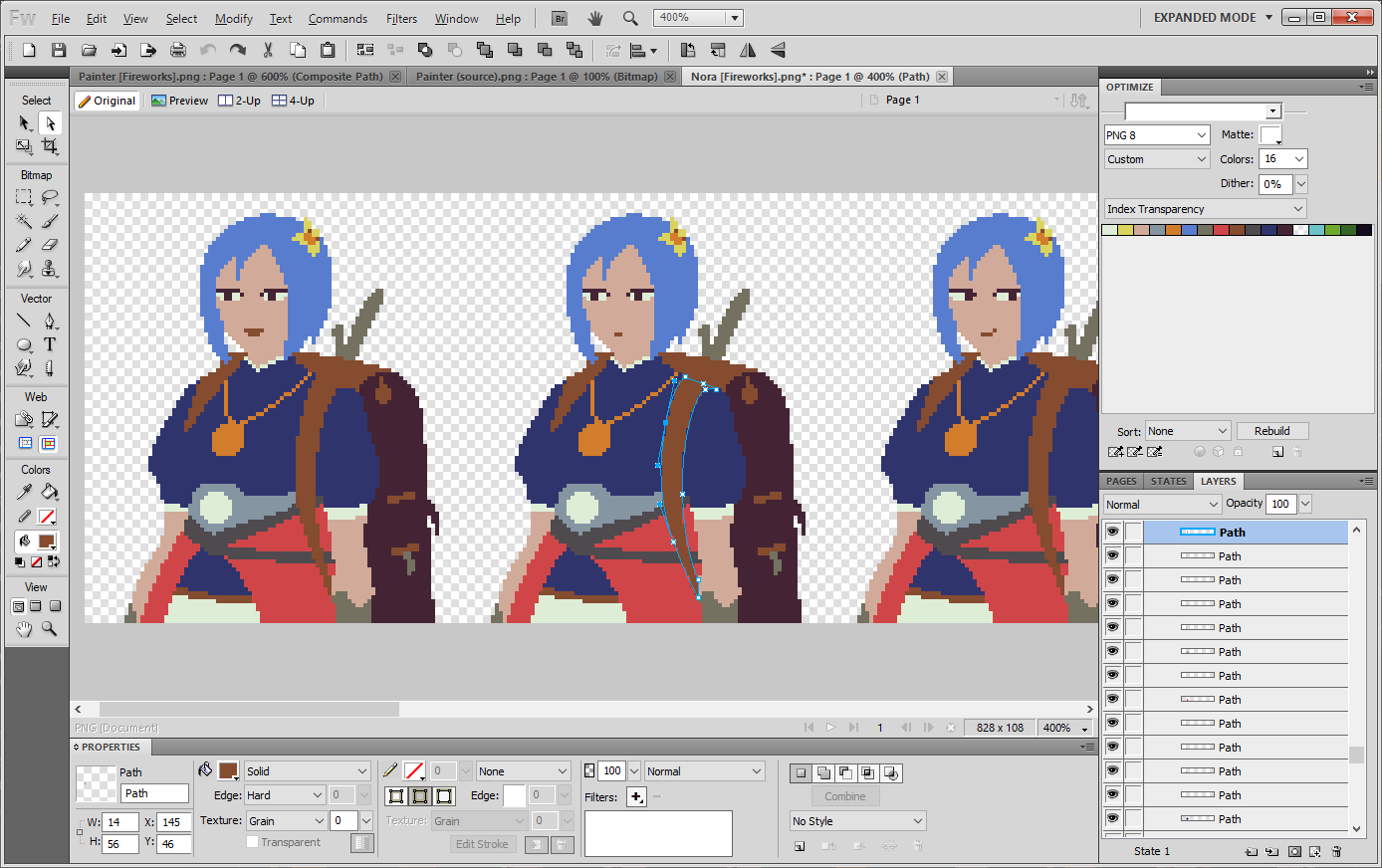
Here's an example of an older image, generated with an older model on my previous GPU:

OMG, WHAT IS UP WITH THAT FACE?!
When I started making For One Year, this was the kind of image that would pass as "good enough to use".
But don't worry, because, look: we're gonna hide all those problems through vectorization!
2. Hand-vectorize the image
It's hard to tell just from a screenshot, but most of the shapes you see were drawn as polygons. If you look at the backpack strap in the center image, you can see the blue outline with dots - that's the underlying polygon, visible because it's the shape I'm currently selecting.
And you can see how the atrocious AI-generated face doesn't matter. I even took a lot of liberties with the hair (though to be honest, that's pushing my skills a bit), added a sword sticking out of her backpack (is that a sword??), tweaked the bits on the backpack, and turned that odd medallion on her chest into a necklace.
There are AI tools that will vectorize an image for you, but those don't produce shapes that are very good for tweaking (which I'm going to need to do to make different poses).
But it's fine: I find the activity of hand-vectorizing to be a nice break from coding, sometimes. Fire up a podcast or some music, and just... go.
Anyway, here's another before & after - this time a sneak-peak into the painter character who will be included in For One Year's next release:

(It's definitely possible to get good faces, and I do need good faces for the full-screen art, but today we're talking portraits, and again: for portraits it just doesn't matter, because of the vectorization step!)
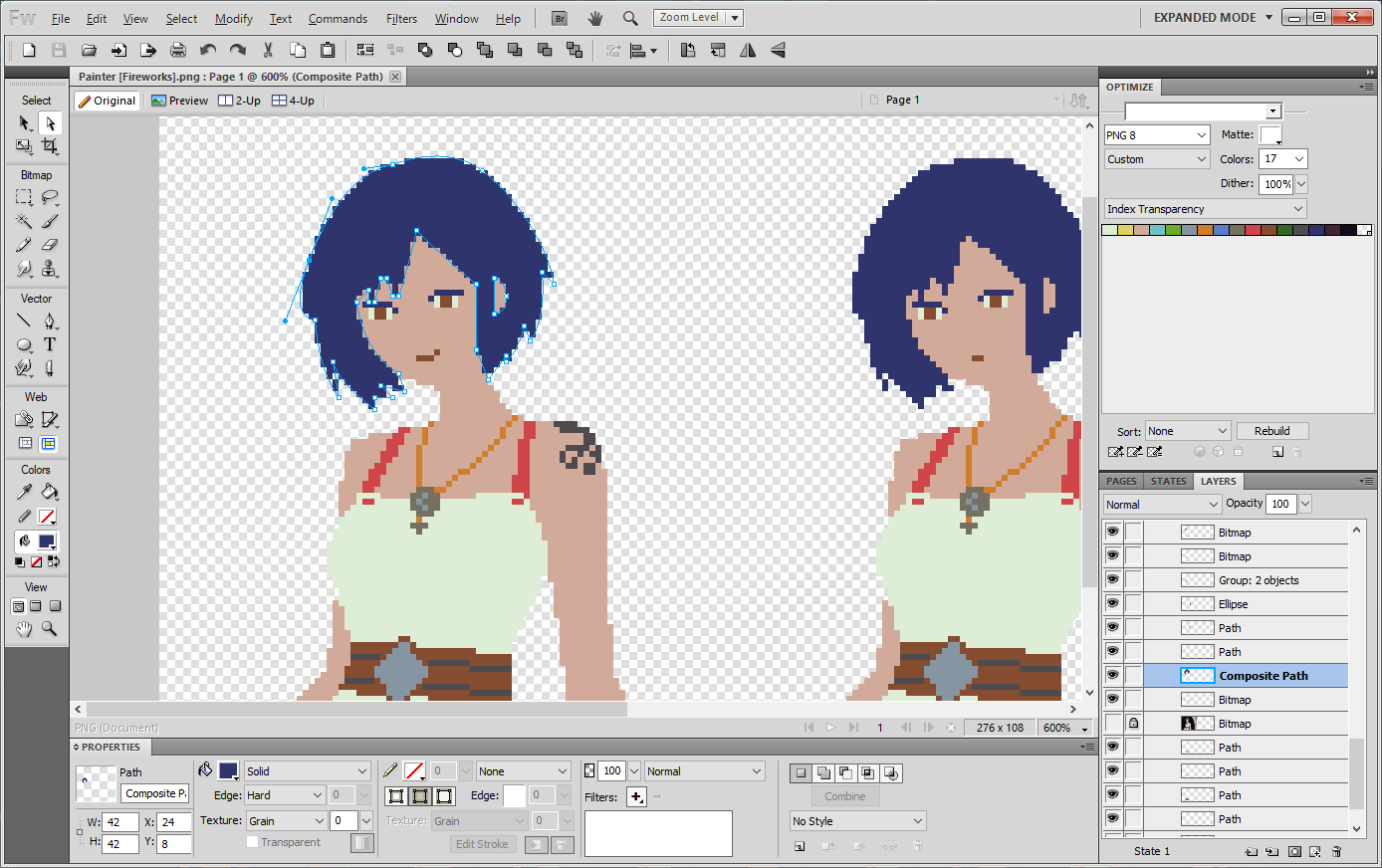
You might wonder "why bother having the AI render the full body, if you're not even going to use it?" I've found that if I don't give enough room for the full body, then other parts of the body I do want also get cropped out: the top of the head, the shoulders, the arms. To ensure no cropping takes place, I just give the AI a big enough canvas to fit the full body. It takes a little longer to generate, but not by that much. It's also really frustrating to get an image that's exactly what you wanted, except some crucial part is cropped out, rendering it useless, so I'm happy to reduce the number of times that happens!
3. Hand-make variations: expressions, outfits, and more!
Vectors aren't only good for people, like me, who can't draw a basic shape to save their life. By being smart about how the shapes are laid down, it's easy to make variations on the base image.
Besides facial expressions, I can flip someone's head to face the other way...
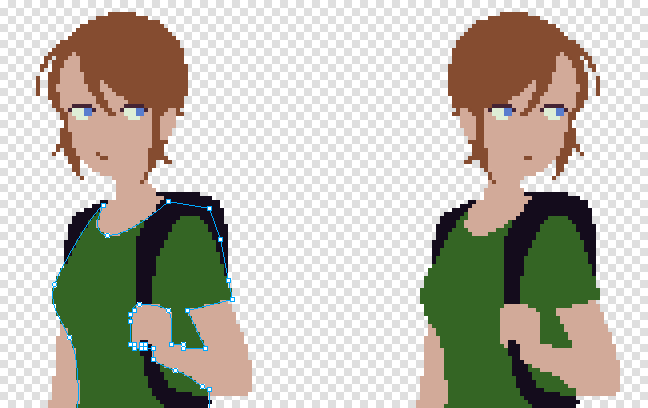
... swap out their outfit...
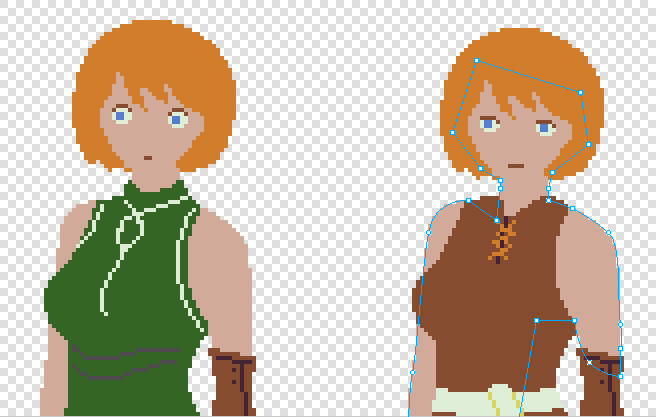
... or maybe swap out their body entirely!
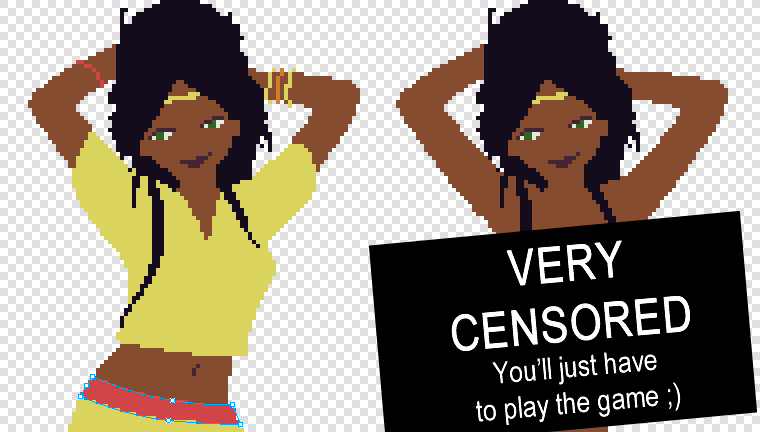
If you look at the selected shapes in each image, it might seem kind of arbitrary how some of the points go off into weird directions and spaces, but the layering is actually really important for making the image easier to change, later. A weird sub-skill that I guess just gets picked up by doing it a lot (and definitely not one I'm perfect at). I've used the term "paper doll" or "paper dolling" a few times - I think paper dolls are a useful analogy when creating & arranging the vectors.
And that's about it!
To summarize, my process for generating portrait is currently:
- Use locally-running AI to generate a base image.
- Hand-vectorize the image, cleaning up mistakes and adding/changing details as needed.
- Create facial expressions.
- For some characters, create alternate poses, outfits, etc (possibly by repeating steps 2 & 3, and combining the results with the original).
- Work within my limitations: aim for low-resolution, low-color art as the final output.
I hope it was interesting to learn about how For One Year's art was made, and maybe inspires you to make some art yourself!
Have fun! ;)